Discover
Edit
Video
Apps
Pricing
Discussions
Sign In
Sign In
Home
Discover
Gallery
Capsule Gallery
Edit
Video
Apps
Pricing
Discussions
Theme
Light
Dark
System
Language
ギルドマスター
All Tags
Latest
Popular
View
.
..............
.
..............
2
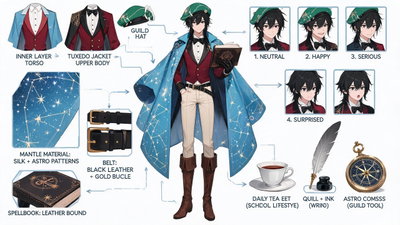
Generate a comprehensive character concept breakdown image based on Image 1. The image must feature the full-body character design at the center, surrounded by detailed elements such as layers of clothing, different facial expressions, core items, material close-ups, and everyday personal items that showcase the character's lifestyle. The character has the same pose as the one in Image 1. Visual Specifications:スレンダーで背が高い男性王家学者、整えられたセミロング黒髪、黒い目、超タイトなライトベージュ色薄地デニムジーンズに金のバックル付き黒のレザーベルト、濃い紅色を基調とした特徴的な執事タキシード服に黒の蝶ネクタイ、占星術師の装飾が施された空色の横長い国王マント、茶色い革のマジックナイトロングブーツ、緑色を基調とした特徴的なギルドマスター帽子、右手に呪文書を装備している. 1. Composition Layout: - Center Position: Place the character's full-body or primary dynamic pose as the visual anchor. - Surrounding Position: Neatly arrange the deconstructed elements around the central character. - Visual Guide: Use hand-drawn arrows or guide lines to connect the surrounding elements to the corresponding part of the character (e.g., a bag connected to the hand). 2. Deconstruction Details – Key Iterative Areas: - Clothing Layers: Break down the character's outfit into individual pieces. If layered, show the state of the inner layers when outer layers (like jackets) are removed. - New Addition – Underwear Deconstruction: Independently display the character's innerwear, focusing on design and material details. - Expression Set: In corners, draw 3-4 different headshots showcasing different emotional expressions. - Material Close-ups: Select 1-2 key areas for zoomed-in material textures. - New Addition – Item Texture Close-ups: Add depictions of small items, focusing on their textures. - Associated Items: This section goes beyond large props and includes "lifestyle fragments":
ぬ
ぬこぽん
ぬ
ぬこぽん
1
ぬ
ぬこぽん
ぬ
ぬこぽん
2
ぬ
ぬこぽん
ぬ
ぬこぽん
3